Monday 06 Apr 2026
Encrypt files with PGP key
I have been playing with encryption algorhtims to encrypt files. I have purchased a tape drive to migrate away from online "cloud" storage due to costs and time to upload/download.
I settled on using Pretty Good Privacy (PGP) which was the original encryption software created by Phil Zimmermann in 1991.
It introduced a practical way to:
- Encrypt files and emails
- Digitally sign messages
- Verify identity/authenticity using public/private keys
Quick Start
To encrypt a file, do:
gpg -e -r me@local file_name
me@local is the email used when creating the key. The -r switch specifies recipient
To decrypt:
gpg -d -o file_name file_name.enc
Create PGP Key
GPG typically creates:
- A primary key used for signing and identity verification
- A subkey used for encryption
- Choose Encryption Type: ECC
- Protect the key with a strong password
If on Ubuntu, use Seahorse or other tool. Otherwise commands:
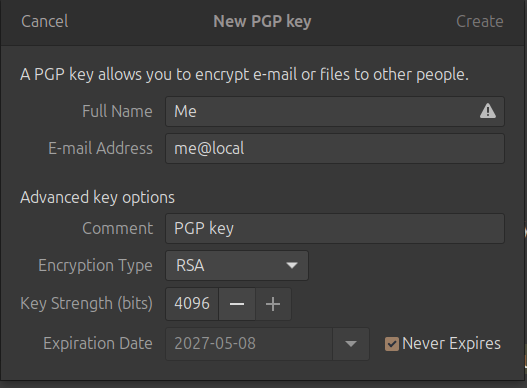
RSA older and larger key sizes (encryption is slower on modern hardware); so use ECC (faster encryption and smaller key sizes)
Run the command:
gpg --full-generate-key
And choose options:
(9) ECC (sign and encrypt) *default*

0 = key does not expire

Real name: Me
E-mail address: test@local
Comment: A test key
You selected this USER-ID:
    "Me (A test key) <test@local>"
Backup, Backup, Backup
It is extremely important to backup your private key. Should you lose this you will not be able to decrypt your encrypted file.
gpg --export-secret-keys --armor me@local > /path/me.private
Guard this key. Ensure you use a strong password to protect the key. The password you specify is not used to encrypt files, it's the key itself.
To import the key to a new machine, use this command and choose options:
gpg --import /path/me.private
Then run command (to trust):
gpg --edit-key {name}@local
Type:
trust
Choose option 5:
5 = I trust ultimately
Type:
quit
Done
I will write a separate article discussing tape backup with encryption.
Backlinks:
index
Journal:Index
Journal:2026:04